FiveM Scripts
Plenix Radio
📟 Plenix Radio
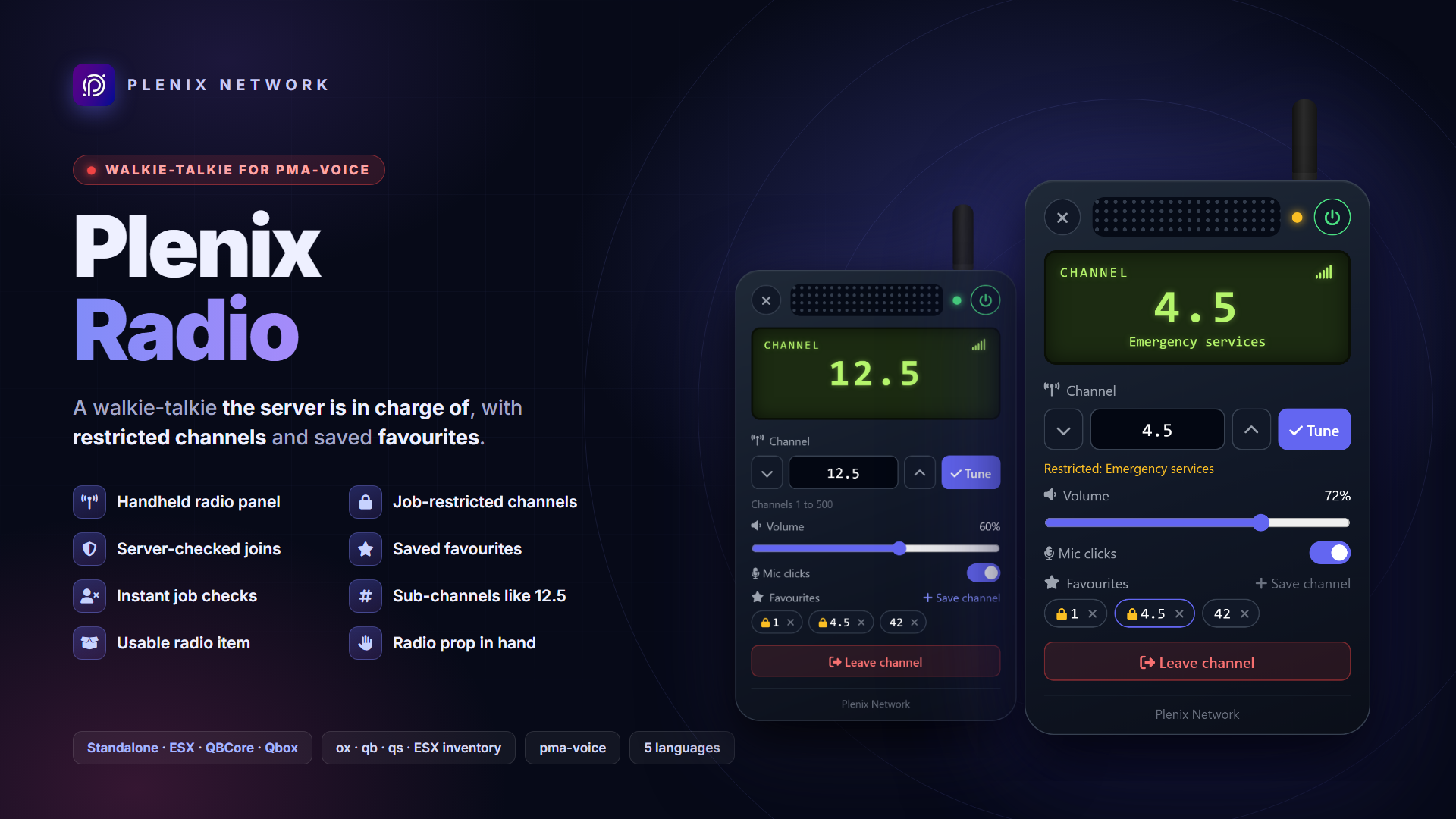
A walkie-talkie for pma-voice that the server is in charge of. Players tune to a channel, set the volume, switch mic clicks on or off, keep a few favourite channels and leave when they are done, all from a handheld radio panel.
Some channels belong to the police, the paramedics or whoever you choose, and the server checks every join, so a modded client can't listen in.
📟 The radio panel
- Handheld radio panel: power switch, channel entry with up/down, volume slider, mic clicks and leave channel, all on a radio-shaped panel.
- Favourite channels: each character keeps a few, saved in your database so they follow them to any PC; one click tunes in.
- Sub-channels: decimals like
12.5, from 0 to 3 places. - Talk with the panel open: pma-voice's radio key and walking keep working while the panel is on screen.
- Radio in hand: a prop and an animation while the panel is open, cleaned up when it closes, when the player dies and when the resource stops.
- Radio beeps: power on and off, tuned in, left the channel and refused, made by the panel itself (no audio files). pma-voice adds its mic clicks when you talk.
🔒 Restricted channels
- Ranges kept for jobs and minimum grades (ESX, QBCore / Qbox), or for an ACE on any framework and in standalone. Optionally on duty only with QBCore / Qbox.
- Job changes count at once: lose the job or the grade and you are off the restricted channel straight away.
- The screen shows the channel and, on a restricted one, its name.
🎒 Item and access
- Usable item:
radio, the item most servers already have. Players who lose it are taken off the radio. - Without items, a command and a key open the radio, for everyone or only for players with an ACE.
- Any setup: Standalone, ESX, QBCore or Qbox, with ox_inventory, qb-inventory, qs-inventory or the ESX inventory, detected on start.
- 5 languages: English, Spanish, Portuguese, French and German.
- Developer exports: read or set a player's channel from your own server scripts, check whether a player is on the radio, open the radio.
🛡️ Server-authoritative
- Players only ask: the server checks the item, the channel range and decimals, the job and grade or the ACE, and a rate limit, then moves them with pma-voice itself.
- Every restricted channel also gets a pma-voice channel check, so a client asking pma-voice directly for a restricted channel is refused.
- Players on a restricted channel are checked again on a timer and on every job change.
📋 Requirements
- Voice: pma-voice with radios on (
voice_enableRadios 1, its default) - Framework: Standalone, ESX Legacy, QBCore or Qbox
- Inventory: ox_inventory, qb-inventory, qs-inventory or the ESX default; none in standalone
- Optional: ox_lib for notifications (the framework's or the game's own are used otherwise)
- Optional: oxmysql to keep each character's favourites in the database (without it, each player's own game keeps them)
📦 What you get
- The resource, protected by Cfx.re asset escrow. The config file, translations, framework bridges, install snippets and the whole interface stay open, so you can adapt it to your server.
- Ready-to-paste item setup for ESX, QBCore / Qbox, ox_inventory and qs-inventory, and the favourites table's SQL.
- Full documentation: installation, restricted channels, configuration, developer exports and troubleshooting.
Licensed for use on your own servers. Sharing or reselling it, or any part of it, is not allowed.
Plenix EAS
🚨 Plenix EAS
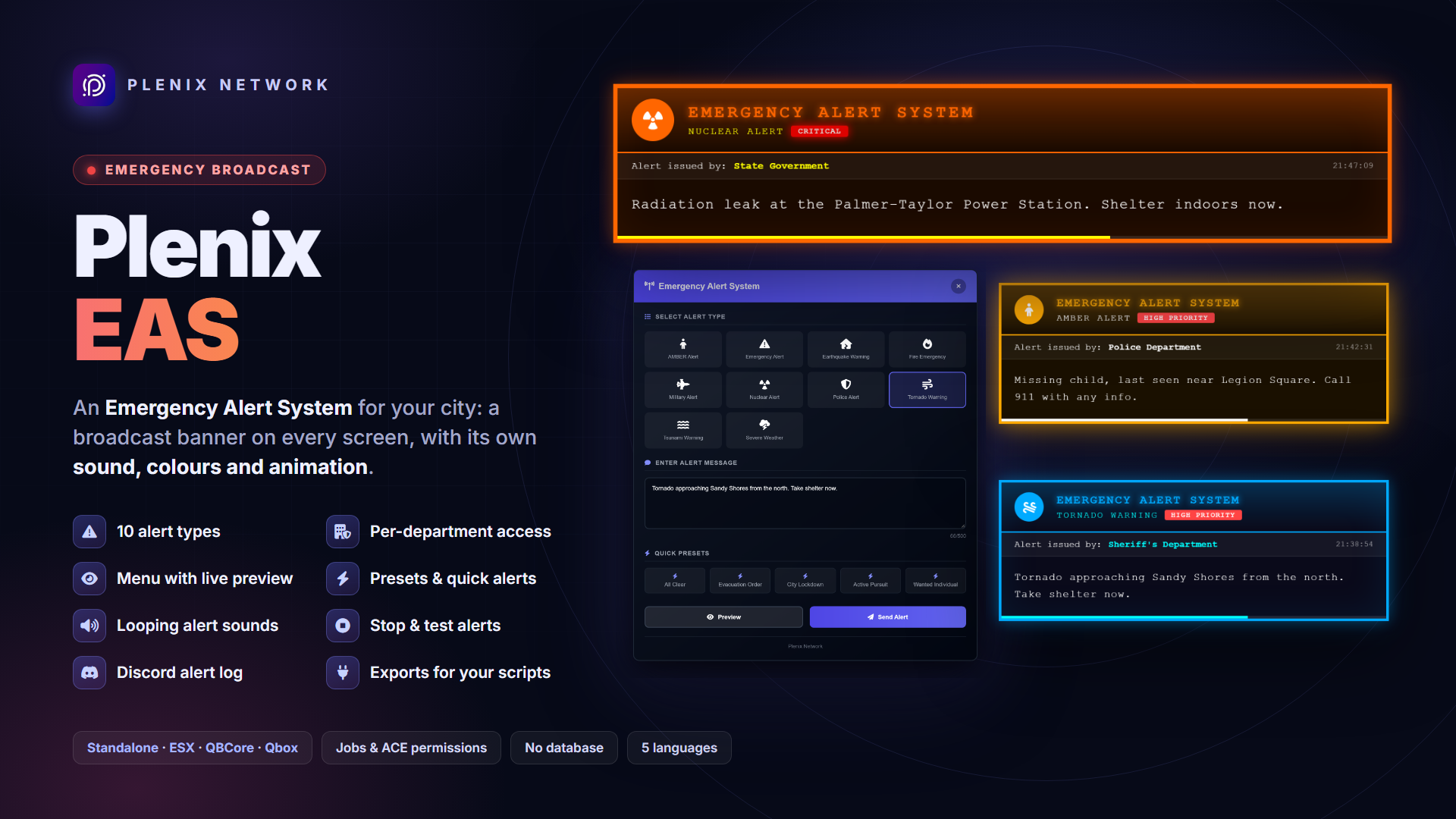
Broadcast-style emergency alerts for your city. Let police, EMS, the government or your staff put an emergency alert on every player's screen: a full-width broadcast banner with its own sound, colours and animation for each kind of emergency, from an AMBER Alert to a nuclear warning.
Each department sends only the alert types you allow it, and the server checks every alert before anyone sees it.
🔴 The alerts
- 10 alert types: default, nuclear, tornado, AMBER, earthquake, tsunami, fire, police, military and severe weather, each with its own sound, colours, animation, icon, priority and duration.
- 10 alert sounds included, looping for the whole alert and stopping with it.
- Cinematic effects: pulsing glow, shaking, a spinning icon, waves, flickering fire and police lights, with a progress bar counting the alert down.
- Your layout: show alerts at the top, centre or bottom of the screen, and choose the font, sizes, icon, issuer and timestamp.
- Add your own alert types with their own sound and colours.
🖥️ Sending alerts
- Alert menu:
/alertopens a menu with the types you may send, a message box, a live preview and quick presets. - Presets and quick commands: ready-made alerts in the menu and as
/alertlockdown,/alertevacuation…, plus/qalert. - Stop control:
/stopalertclears the alert from every screen. - Test alerts:
/alerttestshows an alert to you alone. - Server console: send, test and stop alerts from the console too.
🏛️ Departments and permissions
- Departments: LSPD, EMS, BCSO, FIB, DOJ, the governor and staff, each with the alert types it may send and its name on the banner.
- Jobs and ACE: allow jobs (with a minimum grade, and on duty if you like) on ESX, QBCore or Qbox, and grant ACE permissions on top, or use ACE alone in standalone.
- Per-type grants: give a player or group one extra alert type, whatever their department.
- Cooldown between two alerts from the same player; staff are exempt.
🏢 Built for your server
- Framework detection: finds ESX, QBCore or Qbox on its own, and runs standalone when none is started.
- 5 languages: English, Spanish, German, French and Portuguese.
- Discord log: every alert, who sent it and from where, in a channel of your choice.
- Developer exports: send an alert from your dispatch, weather or event scripts, to everyone or to chosen players, or check whether a player may send alerts.
- No database tables and no items.
🔐 Secure by design
- Every alert is authorised on the server: permission, the department's alert types, the cooldown and the message, for the menu, the commands, the presets and the client exports alike.
- Alert text is cleaned on the server and only ever shown as plain text, so no HTML reaches other players' screens.
- Every request from a client is rate-limited, on top of the alert cooldown.
- The Discord webhook stays on the server, and alerts can't ping
@everyonethere.
📋 Requirements
- Framework: Standalone, ESX Legacy, QBCore or Qbox
- Permissions: jobs (ESX / QBCore / Qbox) and ACE, or ACE only in standalone
- Optional: ox_lib for notifications in standalone (the game's own notifications are used otherwise)
- Font: the VCR OSD Mono broadcast font is a free download, not included; without it the alerts use Courier New.
📦 What you get
- The resource, protected by Cfx.re asset escrow. The config files, translations, framework bridges and the whole interface stay open, so you can adapt it to your server.
- 10 alert sounds, ready to use.
- Full documentation: installation, permissions, commands, configuration, developer exports and troubleshooting.
Licensed for use on your own servers. Sharing or reselling it, or any part of it, is not allowed.
Plenix Betting
🎟️ Plenix Betting
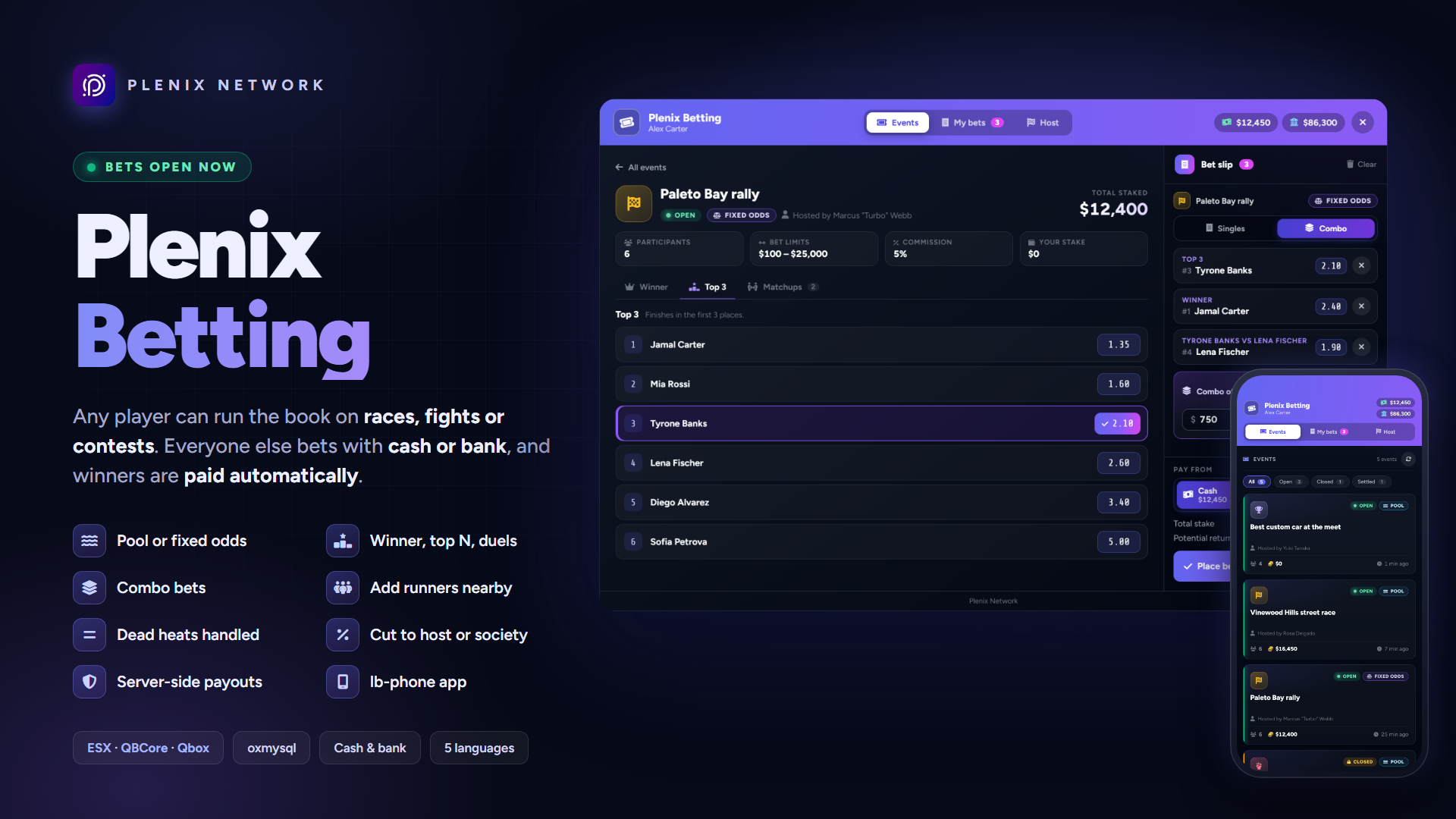
Put money on everything that happens in your city. Let players run their own book: a street race, a fight at the docks, a darts final, anything with a winner. The host creates the event, adds the participants standing next to them, opens the bets and enters the result. Everyone else bets from cash or bank, and every winning bet is paid automatically.
Two ways to run an event: a pool, where the losing stakes are shared by the winners, or fixed odds, where the host sets the prices and backs them with a bankroll.
🏁 Hosting an event
- Any event: races, fights, contests, sports or anything else, with 2 to 16 participants added by standing next to the host, from a nearby list or by server id.
- Three markets: Winner, Top N (finish in the first 2, 3… places) and Matchups (A finishes ahead of B).
- Simple flow: create, add participants, open bets, close them when it starts, then tap the finishing order. A preview shows winners, payouts, refunds and commission before you confirm.
- Commission to the host, the host's job society, a society you choose, or nobody (esx_addonaccount, qb-banking, qb-management and Renewed-Banking).
- Who may host: everyone, an ACE group, jobs or a betting license item. Staff can close, settle and cancel any event from anywhere.
📈 Pool or fixed odds
- Pool betting: every market is its own pot, live odds move as bets come in, and the commission only ever comes out of the losing money.
- Fixed odds: the host sets the prices, puts up a bankroll and can change the odds while bets are open. Every bet keeps the odds it was placed at.
- Liability control: a fixed-odds bet is only accepted when the bankroll can pay the worst result. Too big? The slip says the most the host can still cover.
- Combos: up to 5 legs from one event, odds multiplied.
- Dead heats and voids: ties for 1st, ties across the last top-N place and tied matchups are settled the way real bookmakers do, exactly, down to the last unit.
🎯 For bettors
- A board that's easy to read: every event with its markets, odds or pool share, and a bet slip with quick stakes, singles or combo, cash or bank.
- Never a surprise price: if the odds move after you add a bet, the slip shows the new price and asks you to accept it.
- My bets: pending, won, lost, refunded or void, with what each one paid.
- Automatic payouts: winnings and refunds are paid the moment the result is in. Players who are offline are paid when they next load their character.
- lb-phone app: the same board in a Bets app on the phone.
- Bookmakers: betting points with blips, ox_target / qb-target or a prompt, optionally the only places where bets can be placed.
🔐 Secure by design
- Every amount, selection, distance and permission is checked on the server, in whole numbers.
- A lock on every event's money, and rate limits on every request.
- Every payout is queued in the database and claimed once; any payout the game can't confirm is held for staff, with a command to check and retry it.
- Hosts can't cancel once bets close (configurable), so nobody walks away from a losing book.
⚙️ Built for your server
- Live updates: odds, pools and the host's figures update for everyone looking at the event.
- 5 languages: English, Spanish, German, French and Portuguese.
- Saved in your database (oxmysql): the tables are created on the first start.
- Discord log of events, bets, results, cancellations and held payouts.
- Developer exports: read events, settle or cancel them from your own scripts, open the board.
📋 Requirements
- Framework: ESX Legacy, QBCore or Qbox
- Database: oxmysql (MySQL or MariaDB)
- OneSync: on
- Optional: ox_target or qb-target for the bookmakers, lb-phone for the phone app, a society banking script for commission paid to societies
📦 What you get
- The resource, protected by Cfx.re asset escrow. The config files, translations, framework bridges, install snippets and the whole interface stay open, so you can adapt it to your server.
- Ready-to-paste items (betting slip and betting license) for ESX, QBCore / Qbox and ox_inventory.
- Full documentation: installation, hosting, the betting rules with worked examples, configuration and troubleshooting.
Licensed for use on your own servers. Sharing or reselling it, or any part of it, is not allowed.
Plenix Fireworks
🎆 Plenix Fireworks
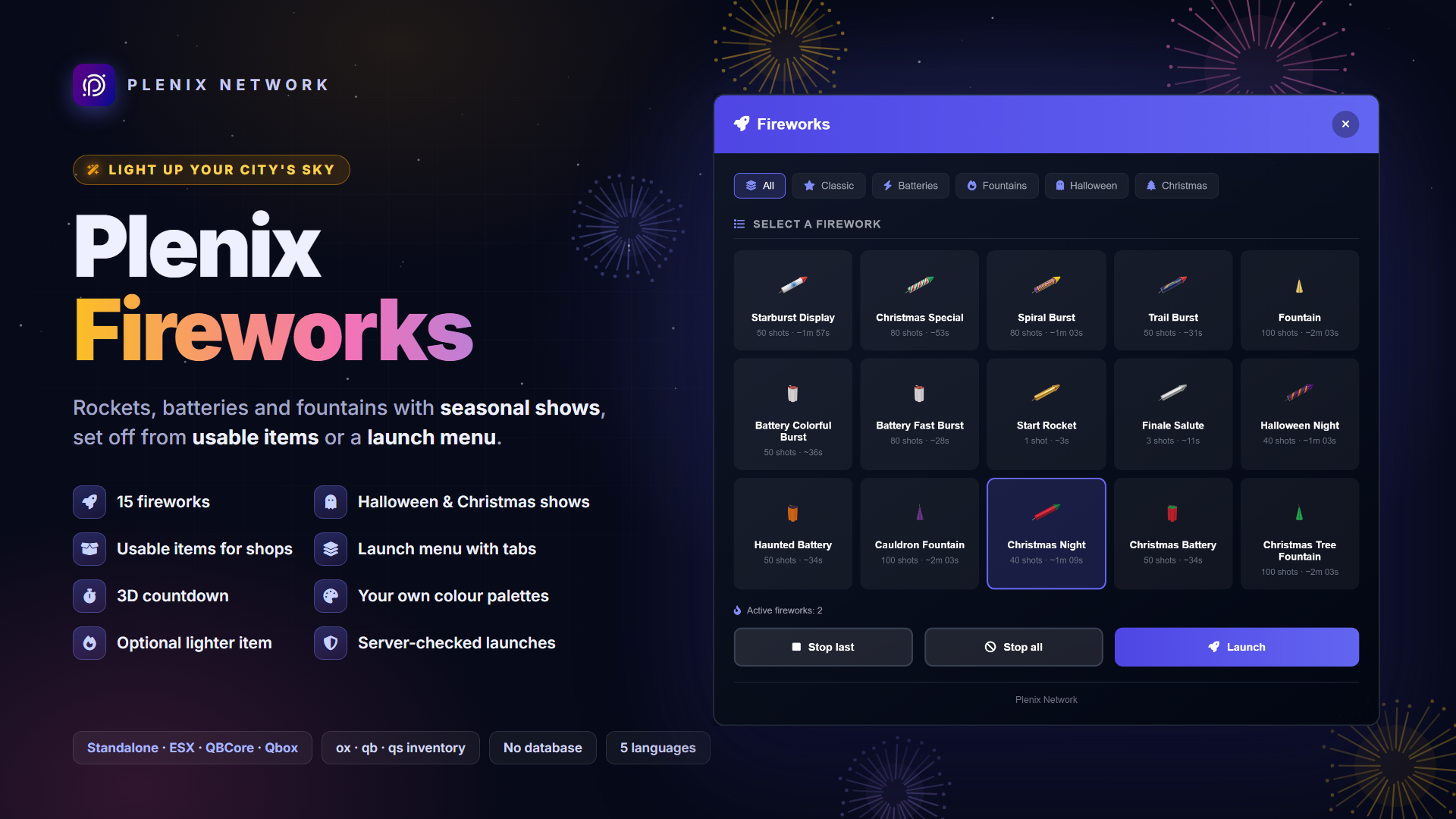
Light up your city's sky. Rockets, batteries and fountains built from GTA's own firework effects, with Halloween and Christmas shows in seasonal colours. Players set them off from usable items you can sell in shops, and staff launch any of them from a menu.
The server checks every launch before the box is placed: the firework, the lighter, the item, where the player stands, a cooldown and how many fireworks they already have going off.
🎇 15 fireworks
- Classics: Starburst Display, Spiral Burst, Trail Burst, a Start Rocket with a single big explosion and a Finale Salute with 3 massive ones.
- Batteries: rapid colourful or fast bursts that fill the sky.
- Fountains: ground fountains, plain or in seasonal colours.
- 3D countdown above the box before the first shot.
- Networked effects: other players see the show too.
🎃 Seasonal shows
- Halloween: orange, purple and green bursts, a Haunted Battery with ghostly smoke and a Cauldron Fountain.
- Christmas: red, green, white and gold bursts with a star rocket, a Christmas Battery and a Christmas Tree Fountain.
- Your own colours: tint the effects with RGB palettes, and give accents a chance to fire on only some shots.
- Accents from newer game builds are skipped on older ones, and the rest of the show plays.
🚀 Items and launch menu
- Usable items: one item per firework, with an optional lighter, so you can sell them in shops.
- Launch menu:
/fireworks(or a key players bind) opens tabs per category, launches any firework without an item, and stops your last or all menu fireworks. - Menu permission by ACE, by job and minimum grade, for everyone, or for nobody (items only).
- Add your own fireworks: each one is a config entry with its prop, shots, timings, particles and menu tab.
🔐 Server-authoritative
- Every item and menu launch is checked on the server: the firework, the lighter, the cooldown and the number of fireworks going off at once.
- The item is only taken once the launch passes every check, so a refused launch never costs one.
- With OneSync the server places the box in front of the player and refuses launches from vehicles.
- The launch limits live in a server-only config file that players never receive.
🧩 Built for any setup
- Standalone, ESX, QBCore or Qbox, detected on start.
- 5 languages: English, Spanish, German, French and Portuguese.
- No database tables.
🔌 For developers
- Launch from your own scripts: give a player a firework from an event, a casino prize or a city show with one server export. It skips the menu permission, the lighter, the item and the cooldown, and keeps the position checks and the active limit.
- List, count and stop: every configured firework, how many a player has going off, and stop them without a notification.
- Open the menu from a target, a radial menu or a phone app; the server still checks the permission.
- Script launches show up in the Discord log, and players can stop them from the menu.
📋 Requirements
- Framework: Standalone, ESX Legacy, QBCore or Qbox
- Inventory: ox_inventory, qb-inventory, qs-inventory or the ESX default; none in standalone (the menu launches)
- OneSync: recommended (the server then places the box and refuses launches from vehicles)
- Optional: ox_lib for notifications in standalone (the game's own feed is used otherwise)
📦 What you get
- The resource, protected by Cfx.re asset escrow. The config files, translations, framework bridges, install snippets and the whole interface stay open, so you can adapt it to your server.
- Ready-to-paste item setup for ESX, QBCore / Qbox, ox_inventory and qs-inventory, plus an image for every firework item and the lighter.
- Developer exports to launch, list, count and stop fireworks and open the menu from your own scripts.
- Full documentation: installation, menu permissions, configuration, seasonal colours, the developer API and troubleshooting.
Licensed for use on your own servers. Sharing or reselling it, or any part of it, is not allowed.
Plenix Sell Vehicles
🚗 Plenix Sell Vehicles
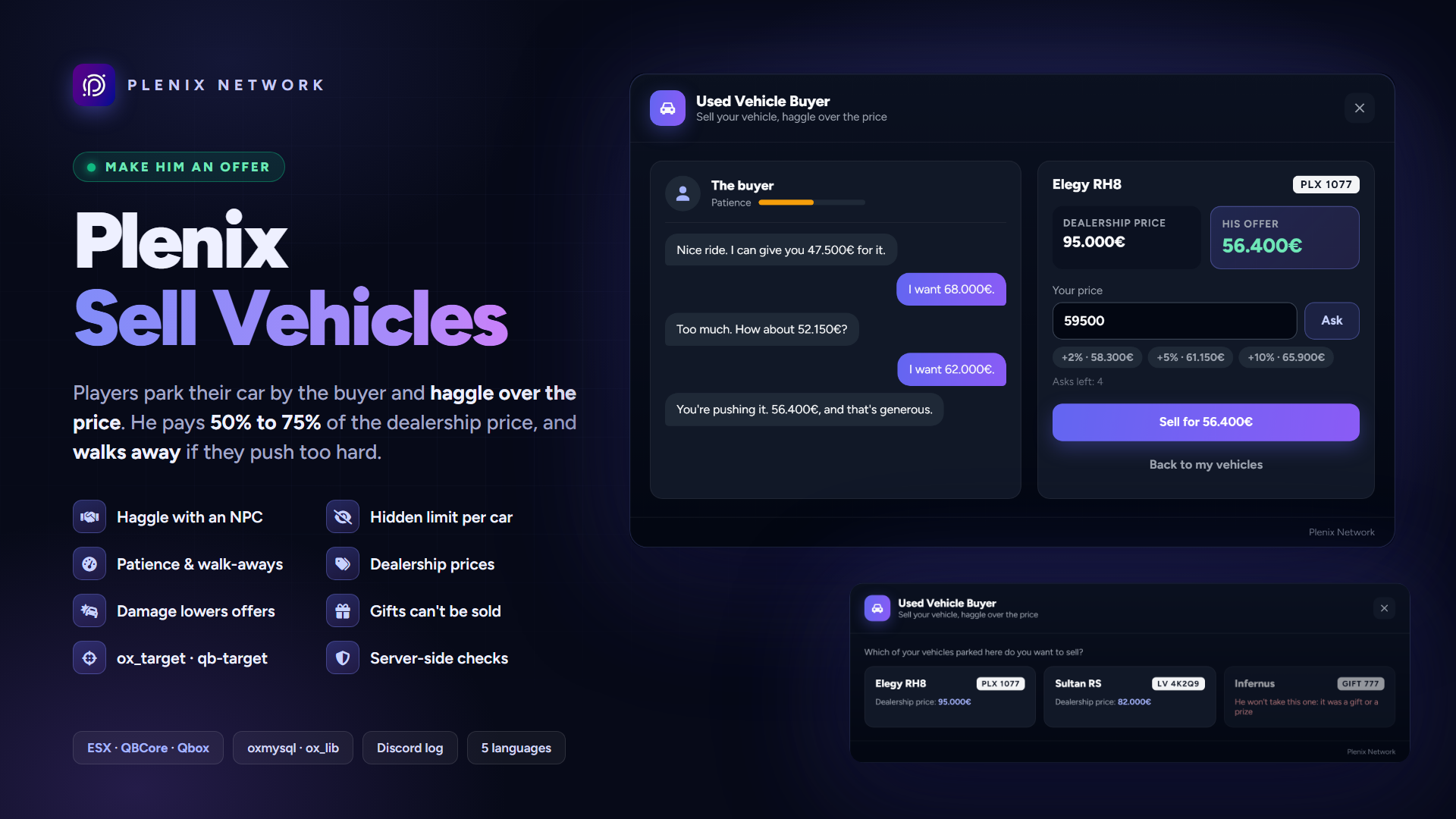
A used vehicle buyer your players haggle with. Players park a vehicle they own next to the buyer, talk to him and get an offer: half of what the dealership charges for it. From there they haggle, asking for more while his patience lasts. Push too hard and he walks away; settle in time and the vehicle is gone and the money is in the bank, somewhere between 50% and 75% of the dealership price.
A money sink that feels like roleplay: players get something back for cars they're done with, and your economy never pays more than you allow.
🤝 Haggling
- Talk to him: ox_target, qb-target or a simple
Eprompt, detected on its own. He lists every vehicle you have parked by his side, and tells you why when he won't take one. - A haggle screen: his offer, the dealership price, your asks and his answers in a chat, a patience bar and quick +2% / +5% / +10% buttons.
- A hidden limit per vehicle: somewhere between 50% and 75% (you choose the range). Ask at or under it and he agrees; ask above it and he loses patience and comes up part of the way.
- He walks away: at zero patience he leaves and won't talk about that vehicle for a while (30 minutes by default). After 6 asks his offer is final.
- No re-rolls: his limit and the haggle's progress are kept per vehicle for 24 hours, so closing the screen and trying again never gets a better deal.
- Condition counts: engine and body damage lower the offer.
🏷️ Dealership prices
- Read from QBCore's shared vehicles or ESX's
vehiclestable (esx_vehicleshop), refreshed every few minutes. - Your own price list in the config (spawn name = price) wins over them, so any dealership script works: copy its prices in.
- Nothing is stored per vehicle: changing dealership later only means updating the list.
🎁 Gifts can't be cashed in
- One export marks a vehicle as not sellable: call
MarkNotSellable(plate)from your casino, welcome car or staff scripts and the buyer refuses it. - Staff commands to mark and unmark a plate in game or from the console.
- Refused on their own: vehicles still being financed (QBCore balance,
paymentsleft, Buty-VehicleShop financing), job and gang vehicles, vehicles stored in a garage or the impound (jg-advancedgarages, ESX and QBCore), and models with no dealership price.
🧩 Built for your server
- Any framework: ESX Legacy, QBCore and Qbox out of the box, detected on their own. Vehicles are read from
owned_vehiclesorplayer_vehicles, where your garages already keep them. - Standalone: connect your own economy and garage through a documented adapter. Until then the buyer stays safely closed.
- Vehicle keys removed with qs-vehiclekeys, qb-vehiclekeys or wasabi_carlock.
- Your setup: where he stands, his model, the offer range, patience, the account he pays into and your currency, all in one config file.
- Discord log of every sale (with the dealership price and how many asks it took), every walk-away and every vehicle marked.
- 5 languages: English, Spanish, German, French and Portuguese.
- No setup in the database: its one small table is created on the first start.
🔐 Secure by design
- Ownership is checked in the database against the seller's own identifier. With OneSync the plate, model and damage come from the vehicle the server sees parked by the buyer, so a swapped plate can't sell another car.
- The hidden limit never leaves the server: every ask is judged there, and only amounts it offered or agreed to can be accepted.
- The sale removes the vehicle in a single step before paying, so it can never be sold twice.
- One sale per player at a time, rate limits on every request and distance checks to the buyer (OneSync).
📋 Requirements
- Framework: ESX Legacy, QBCore, Qbox, or standalone through the adapter
- Database: oxmysql
- Library: ox_lib
- OneSync: recommended (the server then reads the parked vehicle and checks distances)
- Optional: ox_target or qb-target; qs-vehiclekeys, qb-vehiclekeys or wasabi_carlock
📦 What you get
- The resource, protected by Cfx.re asset escrow. The config files, translations, framework bridges and install SQL stay open, so you can adapt it to your server.
- Developer exports to mark, unmark and check vehicles from your own scripts.
- Full documentation: installation, prices, gifts, the standalone adapter, troubleshooting and upgrade notes.
Licensed for use on your own servers. Sharing or reselling it, or any part of it, is not allowed.
Plenix Bunkers
🪖 Plenix Bunkers
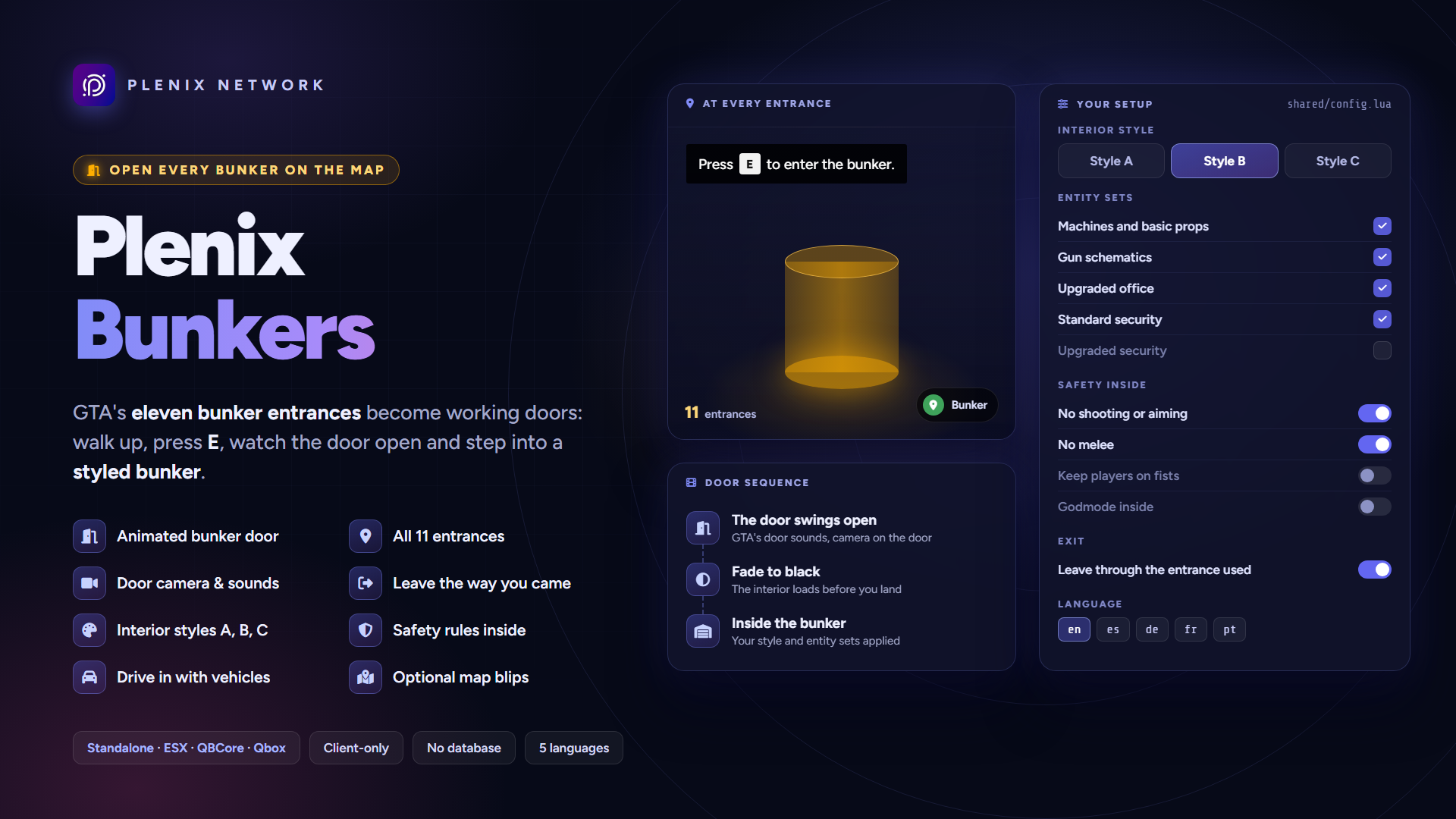
Open every bunker on the map. GTA's eleven Gunrunning bunker entrances become working doors: walk up, press E, watch the door swing open and step into a styled bunker interior. Leave through the same entrance you came in by.
It is a client-only script with no framework code, so it runs the same on ESX, QBCore, Qbox or no framework at all. Blips, sounds, the door camera and the safety rules inside are all set in one config file.
🚪 Entering a bunker
- All 11 entrances: a marker at every Gunrunning bunker, with the bunker IPLs loaded for you. Add your own entrances by their coordinates.
- Door animation: the real bunker door opens with GTA's own door sounds and an optional camera on it. Where there is no door prop, the screen simply fades.
- No falling through the floor: the interior and its collision are loaded before the player lands inside.
- Same way out: players leave through the entrance they used, or at one fixed exit point if you prefer.
- Vehicles too: a player driving into the marker takes the vehicle with them.
- Shared interior: every entrance leads to the same bunker, so players from different entrances meet inside.
🎨 Interior styling
- Style A, B or C, or keep the current one.
- Entity sets you pick: machines and props, gun schematics, the upgraded office, standard or upgraded security.
- The interior is found from its coordinates, so it keeps working when the game build changes its id.
🛡️ Safety rules inside
- No shooting or aiming and no weapon wheel inside the bunker.
- No melee, which stops ragdoll and wall-clipping abuse.
- Optional: keep players on fists and godmode inside, switched off again when they leave.
⚙️ Built for your server
- Optional map blips on every entrance, with your own sprite, colour and scale.
- Markers your way: type, size, colour, height and the distances at which they show and react.
- On-screen prompts ("Press E to enter the bunker") you can turn on, and the key you pick.
- 5 languages: English, Spanish, German, French and Portuguese.
- Clean restarts: door parts, camera, blips, godmode and screen fade are reset when the resource stops.
- Nothing for cheaters to call: no server events, no database and no secrets.
🔌 For developers
- Send players in and out from your own scripts (a property, a mission, a menu), with the same door, fade and safe landing as the entrances.
- Check where they are: whether a player is inside, and the list of entrances.
- Entered and left events on the player's game, however they got there, to hide a HUD or start music.
📋 Requirements
- Framework: any: standalone, ESX Legacy, QBCore or Qbox
- Game build: one with the Gunrunning DLC (every current game build)
- OneSync: not needed
- No database, no items, no jobs, no inventory
📦 What you get
- The resource, protected by Cfx.re asset escrow. The config file and the translations stay open, so you can adapt it to your server.
- Developer exports and events to send players in and out and react when they arrive or leave.
- Full documentation: installation, configuration, the developer API and troubleshooting.
Licensed for use on your own servers. Sharing or reselling it, or any part of it, is not allowed.
Plenix Available Service Discord Notifications
📣 Plenix Available Service Discord Notifications
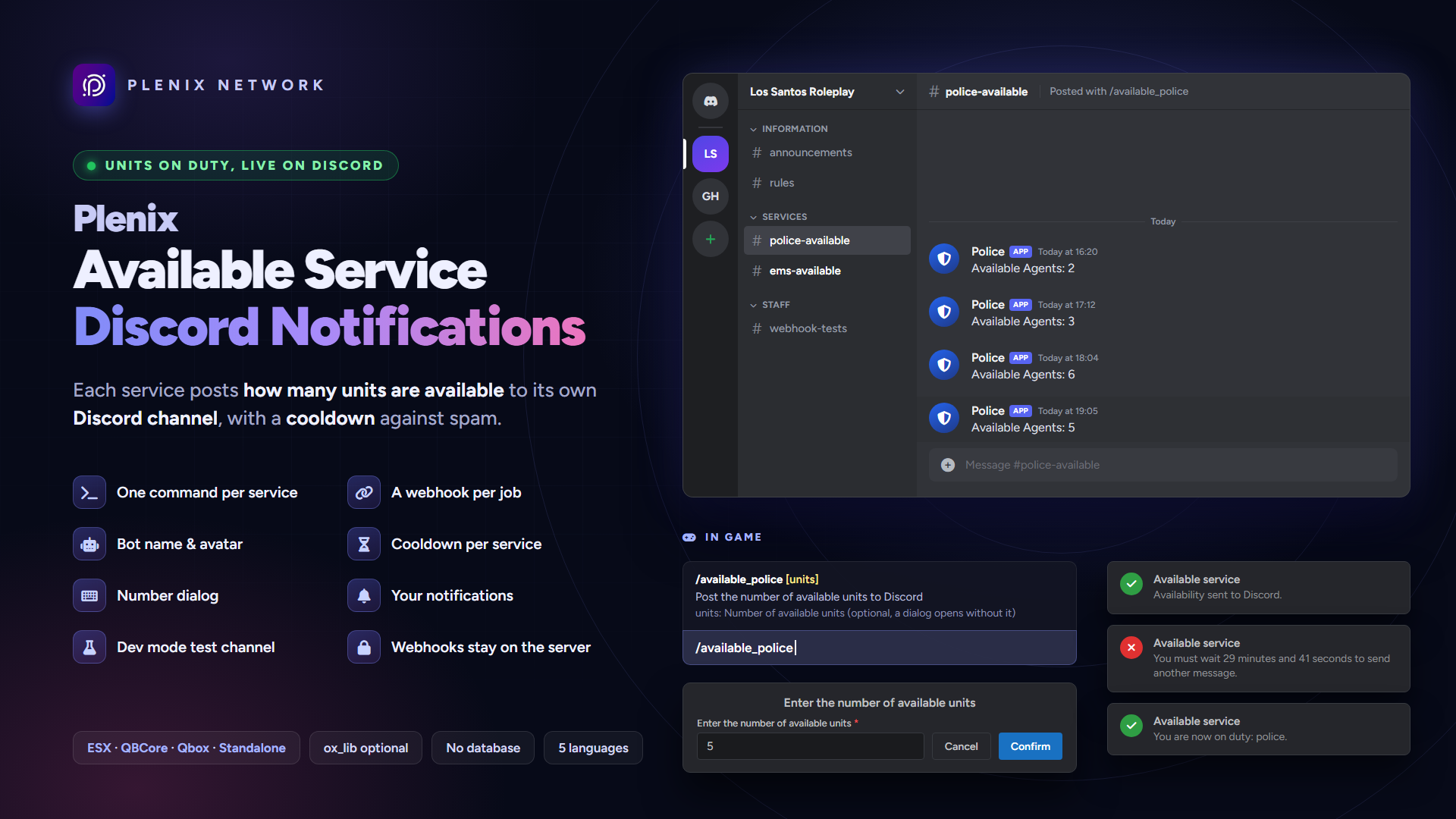
Tell your Discord how many units are on duty. Give each service (police, EMS, mechanics…) its own command that posts the number of available units to the service's Discord channel through a webhook.
Each service has its own bot name, avatar, message and cooldown, so a channel never gets spammed.
👮 For your services
- One command per service:
/available_police 5, or just/available_policeand a dialog asks for the number. - Dialogs that fit your server: ox_lib, the ESX dialog or qb-input, and the game's own keyboard when none of them is installed.
- Cooldown per service: once someone posts, nobody in that service can post again until it runs out. When Discord refuses a post, the cooldown is lifted so someone can try again.
- Your notification system: the framework's, ox_lib, chat, okokNotify, origen_notify or your own.
💬 On Discord
- A webhook per service: every service posts to its own channel, for example "Available Agents: 5" for the police and "Available EMS: 3" for EMS.
- Webhook identity per service: the bot name and avatar each channel posts with.
- Dev mode: send every post to one test channel while you set things up.
- No pings: posts never ping
@everyone,@here, roles or users.
🏢 Built for your server
- Any number of services: add an entry to the config and its webhook, and the new command is there.
- Standalone too: without ESX or QBCore a service is an ACE permission, with a duty command.
- On duty only: players must be on duty to post (QBCore / Qbox job duty, ESX when it tracks duty, the duty command in standalone), or turn it off.
- Framework detection: picks ESX or QBCore / Qbox on its own, and falls back to standalone.
- 5 languages: English, Spanish, German, French and Portuguese.
- No database and no items to set up.
🔐 Secure by design
- Webhook URLs live in a server-only config file or
server.cfg: players never receive them, and they are never printed. - Only Discord webhook links are accepted as webhooks.
- Players only send a service and a number: the text, bot name and channel come from your config.
- The server checks the player's job (or ACE), duty, the number and the service's cooldown, whatever the client says.
- Requests faster than two a second per player are dropped, and a service never posts twice within 10 seconds.
📋 Requirements
- Framework: Standalone, ESX Legacy, QBCore or Qbox
- Discord: one webhook per service channel
- Optional: ox_lib (dialog and notifications), okokNotify or origen_notify
📦 What you get
- The resource, protected by Cfx.re asset escrow. The config files, translations and framework bridges stay open, so you can adapt it to your server.
- Full documentation: installation, jobs and ACE setup, configuration, troubleshooting and security notes.
Licensed for use on your own servers. Sharing or reselling it, or any part of it, is not allowed.